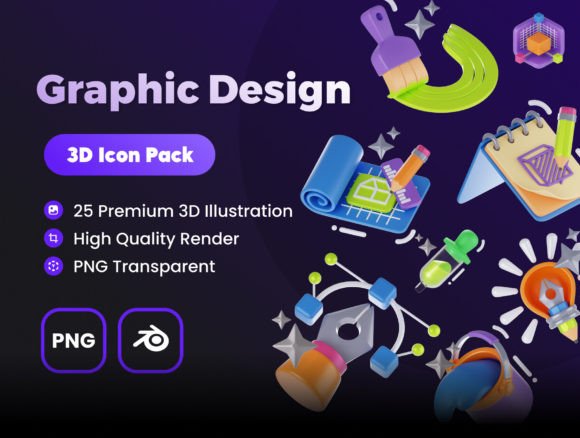
Graphic Design 3D Icon Set: A Practical Guide to Customization and Quality
In the current digital landscape, flat design is no longer the only standard for visual communication. As interfaces become more immersive, the demand for depth, texture, and tactile realism has surged. This is where a high-quality Graphic Design 3D Icon Set becomes an invaluable asset for creators. Whether you are building a mobile application, designing a pitch deck, or refreshing your brand identity, three-dimensional elements can significantly enhance user engagement. However, integrating 3D assets into your workflow is not as simple as dragging and dropping images. Many designers, from beginners to seasoned professionals, overlook critical technical and aesthetic details that can compromise the final output.
Understanding the nuances of these assets ensures that you do not waste time on resources that do not fit your pipeline. The promise of "minimalist 3D icons made with love and passion" is appealing, but practical utility must come first. You need assets that are not just visually pleasing but also technically robust, editable, and compatible with your existing tools. This guide explores common pitfalls when selecting and using 3D icon sets and provides actionable advice to help you make informed decisions.
The Trap of Static Imagery in a Dynamic Workflow
One of the most frequent mistakes creators make is purchasing or downloading 3D icon sets that are delivered solely as static image files, such as JPEGs or non-transparent PNGs. While a 3000x3000 High Resolution Image PNG might look crisp on a presentation slide, it severely limits your flexibility. If your brand guidelines change next quarter, or if you need a slightly different angle for a specific UI element, a static image is useless. You would be forced to search for a new asset or attempt clumsy photo editing tricks that rarely look professional.
The Better Approach: Always prioritize sets that include source files. In this context, having access to 3D Blender Files is a game-changer. Blender is a powerful, open-source 3D creation suite. When you have the native file, you are not just buying an image; you are buying the ability to customize. You can adjust lighting, change camera angles, and most importantly, modify colors and textures to align perfectly with your brand guidelines. This level of control transforms a generic asset into a bespoke design element.
Overlooking Compatibility and Technical Requirements
Another common oversight is ignoring software compatibility. Many entrepreneurs and marketers assume that 3D assets will work seamlessly with any tool they use. This is rarely the case. If you are not familiar with 3D modeling software, acquiring a set that requires complex rendering engines or proprietary plugins can lead to frustration and wasted budget. You might find yourself unable to open the files or struggling with steep learning curves just to change a simple color.
Before committing to a Graphic Design 3D Icon Set, verify the software requirements. For instance, if the set is built for Blender, ensure you have the correct version installed. Blender is free and widely supported, making it an accessible choice for most users. However, if you rely exclusively on 2D tools like Photoshop or Illustrator, check if the provider offers pre-rendered views or if there are easy-to-follow tutorials for basic customization. The goal is efficiency, not adding unnecessary technical debt to your project.
Misjudging Style Consistency and Minimalism
Minimalism in 3D design is deceptively difficult to achieve. A common error is selecting icons that appear simple at first glance but lack cohesive styling when viewed as a group. Inconsistent lighting, varying levels of detail, or mismatched proportions can make your platform or app look amateurish. Users subconsciously notice these discrepancies, which can erode trust in your brand’s professionalism.
When evaluating a set, look for uniformity in the minimalist 3D icons. Are the shadows consistent? Do the materials react to light in the same way across all twenty-five icons? A well-curated set ensures that every element, from a cloud storage symbol to a shopping cart, shares the same visual language. This consistency is crucial for maintaining a polished look across presentations, apps, and marketing materials. Take the time to review the entire collection, not just the preview images, to ensure every piece meets your quality standards.
Ignoring Resolution and Scalability Needs
While vector graphics are infinitely scalable, rasterized 3D renders are not. A frequent mistake is assuming that a standard resolution is sufficient for all use cases. If you plan to use these icons on large-format prints or high-density retina displays, low-resolution assets will appear pixelated and blurry. This degradation in quality can ruin an otherwise excellent presentation or user interface.
Ensure that the Graphic Design Tools 3D Assets you choose provide high-resolution outputs. A specification of 3000x3000 pixels is a strong baseline for most digital and print applications. This resolution allows for crisp details even when scaled down for mobile screens or enlarged for desktop headers. Additionally, having the source files means you can re-render at higher resolutions if needed in the future, providing a layer of future-proofing for your design library.
How to Evaluate Before You Download or Buy
To avoid these pitfalls, adopt a checklist approach when assessing any 3D icon set. First, confirm the file formats. You want a mix of ready-to-use PNGs with transparency and editable source files like .blend. Second, check the license terms. Ensure you have the rights to use the assets in commercial projects, especially if you are a freelancer or small business owner creating work for clients. Third, test the customization potential. If possible, download a sample or view a tutorial to see how easy it is to change colors and textures. The process should be intuitive, allowing you to match your brand palette without extensive technical knowledge.
Finally, consider the versatility of the set. A good Graphic Design 3D Icon Set should include a variety of categories relevant to modern digital products, such as communication, finance, security, and media. The 25 Unique Customizable 3D Icons should cover a broad spectrum of use cases, reducing the need to mix and match from different sources, which often leads to stylistic clashes.
Maximizing Value Through Customization
Once you have selected the right set, the real value lies in customization. Do not settle for the default colors. Use the Blender files to tweak the materials. Adjust the roughness, metallic properties, and base colors to create a unique look that stands out. This effort signals attention to detail and reinforces brand identity. For educators and bloggers, this means creating visuals that are distinct from the generic stock imagery everyone else uses. For app developers, it means creating an interface that feels cohesive and thoughtfully designed.
By avoiding the common mistakes of relying on static images, ignoring compatibility, and overlooking style consistency, you can leverage 3D assets effectively. The right Graphic Design 3D Icon Set is not just a collection of pictures; it is a flexible design system that empowers you to create professional, engaging, and branded content with ease. Invest time in choosing wisely, and the return in visual quality and workflow efficiency will be substantial.