Mastering Packaging Box Design and 3D Box Die Lines for Professional Results
In the competitive landscape of product retail, the first interaction a customer has with your brand is often tactile and visual. This makes Packaging Box Design not merely a container, but a critical marketing tool. However, creating a stunning visual is only half the battle. To bring that design into the physical world, one must master the technical precision of a 3D Box Die Line. Whether you are launching a new cosmetic line, shipping artisanal goods, or rebranding an existing product, understanding the synergy between artistic vision and structural engineering is essential.
This article explores the intricate relationship between creative design elements and the technical specifications required for production. We will delve into how luxury aesthetics, vector scalability, and digital mockups come together to create packaging that stands out on the shelf and performs flawlessly in manufacturing.
The Foundation: Understanding the 3D Box Die Line
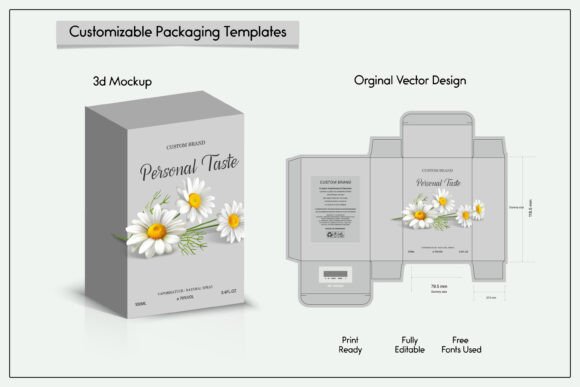
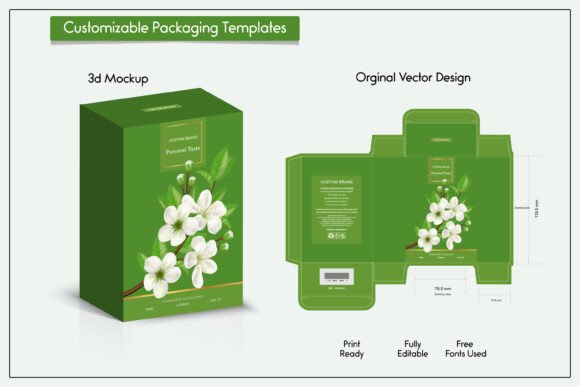
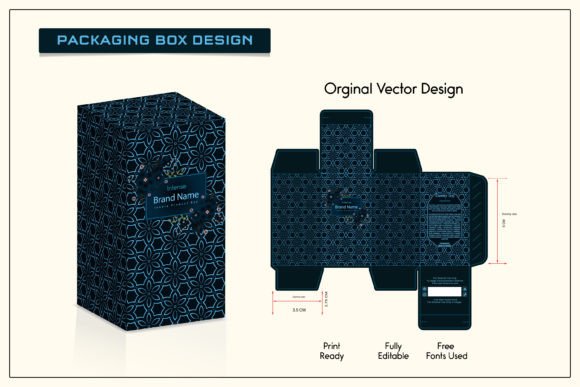
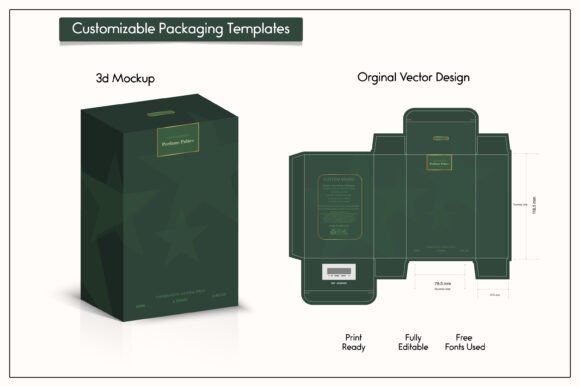
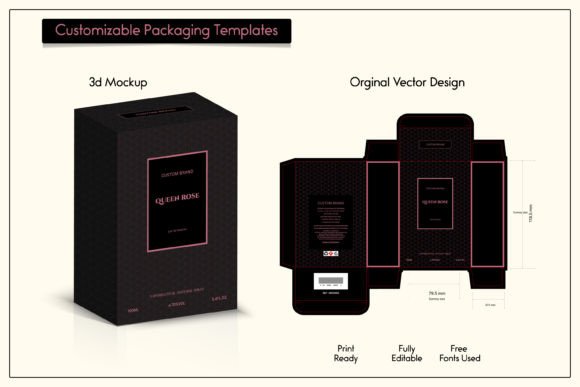
Before any ink hits paper, the structure must be defined. A 3D Box Die Line is the flat, two-dimensional template that serves as the blueprint for your package. It outlines exactly where the cardboard or paperboard needs to be cut, folded, and glued. Without an accurate die line, even the most beautiful design will fail to assemble correctly.
Think of the die line as the skeleton of your packaging. It includes:
- Cut Lines: The outer boundaries where the material is trimmed.
- Fold Lines: Indications of where the material bends, often distinguished by different line styles (e.g., dashed or dotted).
- Glue Tabs: Areas designated for adhesive application to hold the box together.
When working with a 3D Box Die Line, precision is non-negotiable. A discrepancy of even a millimeter can result in gaps, misaligned panels, or a box that simply won’t close. This is why professional designers rely on vector-based templates. Vector designs allow for infinite scalability without loss of quality, ensuring that every curve and corner remains crisp regardless of the final box size.
Elevating Brand Perception with Luxury Perfume Packaging Box Design
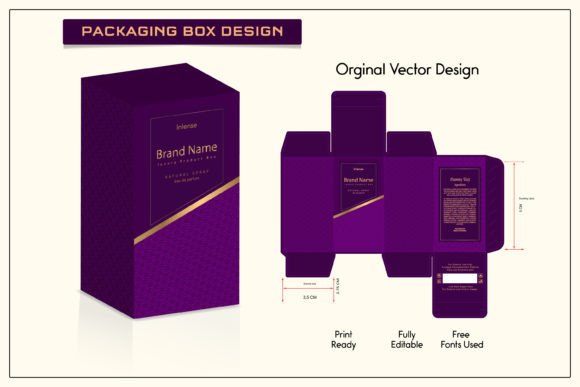
While structural integrity is vital, aesthetic appeal drives consumer emotion. Nowhere is this more evident than in Luxury Perfume Packaging Box Design. In this sector, the unboxing experience is part of the product itself. Consumers expect a sense of occasion, elegance, and exclusivity.
Designing for luxury requires a nuanced approach to Design elements. It is not just about placing a logo on a box; it is about creating a narrative through texture, color, and form. High-end packaging often utilizes:
- Minimalist Typography: Clean, sophisticated fonts that convey modernity and class.
- Premium Finishes: Spot UV coating, foil stamping, and embossing add tactile depth.
- Structural Innovation: Unique opening mechanisms or internal frames that cradle the product securely.
When you integrate these artistic choices with a precise 3D Box Die Line, you ensure that the luxury feel is not compromised by poor construction. For instance, a magnetic closure box requires specific tolerances in the die line to ensure the magnets align perfectly when the box is closed. A generic template rarely accounts for these subtleties, which is why customized, editable vector templates are invaluable for professional creators.
The Power of Vector Design Templates and Scalability
One of the most significant advantages of using professional Packaging Box Design resources is the availability of Vector design Template files. Unlike raster images (such as JPEGs or PNGs), vector files (such as AI or EPS) are based on mathematical paths rather than pixels. This means they can be resized to any dimension without becoming pixelated or blurry.
For business owners and designers, this flexibility is crucial. You might start with a small sample run of 100 units, requiring a specific box size. Later, you may need to scale up to a larger format for a holiday gift set. With a vector template, you can adjust the dimensions of the 3D Box Die Line and the accompanying artwork seamlessly. The 100 original vector Design artworks available in professional packages allow you to experiment with various patterns, backgrounds, and motifs that retain their sharpness at any scale.
Furthermore, vector files are layer-based. This allows you to isolate specific components of your design. You can place your logo on a separate layer above the background pattern, making it easy to update branding without redesigning the entire box. This modularity streamlines the workflow for both personal projects and large-scale commercial operations.
Visualizing the Final Product: 3D Illustration and Box Mockup Labels
Creating a physical prototype for every design iteration is costly and time-consuming. This is where 3D Illustration and Box Mockup labels become indispensable tools. A high-quality mockup allows you to visualize how your flat design will look once folded and assembled.
Modern mockup files often include realistic lighting, shadows, and textures. They simulate how light interacts with different materials, such as matte cardstock or glossy finishes. By applying your design to a 3D Box Mockup, you can identify potential issues before sending files to print. For example, you might notice that a certain color looks too dark in shadowed areas or that a font is too small to read on a side panel.
These mockups are not just for error checking; they are powerful marketing assets. You can use rendered images of your packaging for e-commerce listings, social media campaigns, and pitch decks. This allows you to gauge customer interest and refine your Packaging Box Design based on feedback, all without producing a single physical unit.
What You Receive: File Formats and Practical Usage
When investing in professional packaging resources, understanding the deliverables is key. A comprehensive package typically includes a zip file containing multiple file formats to suit different stages of the design and production process. Here is what you can generally expect:
- AI File: An Adobe Illustrator file that is fully editable. This is where you will make changes to the 3D Box Die Line, adjust colors, and modify text. It preserves all vector data and layers.
- PDF Print File: A high-resolution PDF optimized for printing. This file usually includes bleed areas and crop marks, ensuring that the printer knows exactly where to cut the material.
- JPG File: A raster image useful for quick previews, online sharing, or inserting into presentations. While not editable for print production, it provides a clear visual reference.
To access these files, you will need software capable of unzipping archives, such as the free WinRAR or WinZip software. Once extracted, you can begin customizing the design to fit your specific needs. Remember, these are digital cut files. No physical items will be mailed to you. The value lies in the editable nature of the templates, allowing you to create a bespoke design for your business or personal uses.
Important Considerations and Limitations
While these templates provide a robust starting point, it is important to manage expectations. Please note that this is a mockup file and a design template. It does not include a physical template for making the box yourself at home, nor does it guarantee compatibility with every printing press in the world.
Printers have specific requirements regarding color profiles (CMYK vs. RGB), bleed sizes, and paper thickness. Before finalizing your Packaging Box Design, always consult with your chosen manufacturer. They may require slight adjustments to the 3D Box Die Line to accommodate their specific machinery. Additionally, while vector designs are scalable, extreme resizing may require manual adjustment of font sizes and graphic elements to maintain visual balance.
Who Benefits from Professional Packaging Templates?
The utility of high-quality Packaging Box Design resources extends across various industries:
- Small Business Owners: Entrepreneurs selling handmade soaps, candles, or jewelry can achieve a professional look without hiring an expensive agency.
- Graphic Designers: Freelancers can speed up their workflow by using pre-made Vector design Template structures, focusing their energy on unique branding elements.
- Marketing Teams: Corporations can rapidly prototype new packaging concepts for seasonal campaigns using 3D Illustration and mockups.
- E-commerce Sellers: Online retailers benefit from high-resolution mockups that enhance product listings and reduce return rates by setting accurate customer expectations.
Conclusion
Effective packaging is a blend of art and science. By leveraging professional Packaging Box Design principles and precise 3D Box Die Line templates, you can create products that are not only visually appealing but also structurally sound. Whether you are designing a Luxury Perfume Packaging Box Design or a simple shipping carton, the use of vector templates, Box Mockup labels, and 3D Illustration tools empowers you to iterate quickly and confidently.
Remember, the goal is to create a seamless experience from the digital design phase to the physical unboxing moment. With the right resources—editable AI files, print-ready PDFs, and realistic mockups—you have the freedom to customize, resize, and perfect your packaging. Embrace the flexibility of digital design, respect the technical constraints of printing, and let your creativity shine through every fold and cut.